Smart Office
Fewer tools. More work getting done.
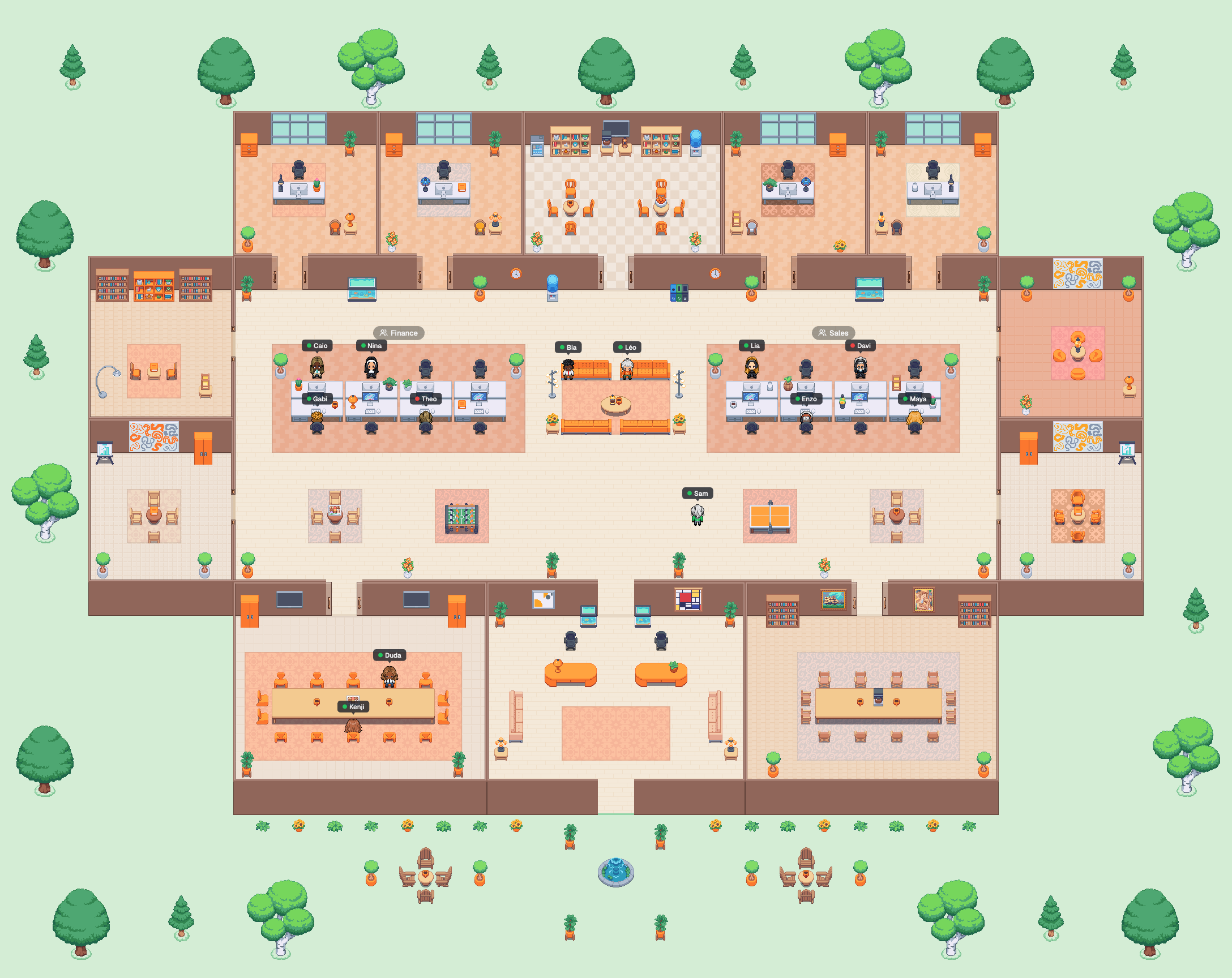
A virtual office where your team actually meets: everyone has an avatar on the map, walks up to a colleague and talks by voice and video. Chat, calendar and your everyday apps are already inside.
Free for up to 3 people · Sign in with Google · No card needed

Lia
Available
See who’s in the office and what everyone is up to.
However the conversation needs
Talk by video, audio or text.
All in the same office, no switching tools: walk up to talk, step into a room for the meeting, or write in chat for whoever isn’t online right now.
Video
Walk up and the cameras open. In a meeting room everyone sees each other, and sharing your screen takes one click.
Audio
Rather just use your voice? Keep the camera off and talk all the same. In chat, record an audio message of up to 1 minute.
Text
Channels, direct messages, threads and mentions, with the history kept for whoever comes later.




The problem
Your team’s work is scattered.
One app to chat, another for calls, a task spreadsheet, the CRM, the request form, the documents folder. Every tool is one more password, one more tab and one more bill at the end of the month. And nobody knows who’s available right now.
 Gather
 Slack
 Microsoft Teams
 Google Meet
 Zoom
 Calendly
 Loom
 Trello
 Asana
 Notion
 Confluence
 Miro
 FigJam
 MindMeister
 XMind
 Fireflies
 Otter
 Pipedrive
 HubSpot
 Zendesk
 Freshdesk
 AgencyAnalytics
 DashThis

Your whole company in one place.
In Bevean Town, conversations, meetings, the calendar and every team’s work live in the same office. You see who’s around, talk right away and get things done without switching tools.
Not an integration. A replacement.
Bevean Town doesn’t connect to these tools: it does their job. You cancel the subscriptions it replaces, and your company pays a single bill.
You cancel → Built into Bevean Town
The office
- Gather2D office
- Slack, Microsoft TeamsChat
- Google Meet, ZoomMeeting rooms
- CalendlyCalendar and booking page
- LoomShort videos in chat
Team work
- Trello, AsanaProjects
- Notion, ConfluenceNotes
- Miro, FigJamWhiteboard
- MindMeister, XMindMind map
- Fireflies, OtterRecording and transcripts
Clients and sales
- Pipedrive, HubSpotDeals
- Zendesk, FreshdeskTickets
- AgencyAnalytics, DashThisClient reports
The office
A real office, in your browser or in the app.
Lay out the map your way, with rooms, desks and an area for each team. Everyone has an avatar and a desk. Whoever is online shows up with their status, and starting a conversation is as simple as walking over. It runs in the browser and in the apps for Mac, Windows, Linux, iOS and Android.
Walk up, talk over audio and video
Move your avatar next to someone and voice and video open instantly, no link, no scheduling. Walk away and the conversation ends. People nearby can’t hear you.
Private meeting rooms
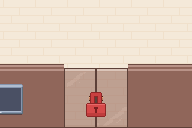
Step into a room and everyone inside can hear each other. Lock the door for a private talk; whoever arrives knocks and waits to be let in. Share your screen and record if you like.
Make the office your own
Pick the floors, wall colors and decor, create rooms and team areas, and put desks wherever you like. On the Capital plan, you can also describe what you want and the assistant builds it. Your team only sees it once you publish.
Your whole team’s calendar, in one place
Find a time that works for everyone, invite a whole team or channel at once, and keep it all in sync with Google Calendar. During a meeting, the map already shows who’s busy.
Every meeting starts with its room chosen
Pick a room on the map right in the event, or book a physical room at the office. With the option on, it locks to guests only at start time, and the meeting notice has a button to go there.
Invite people from outside the office to meetings
The invite goes out by email with the room link, and your client joins from the browser, with no account. Or send your booking page so they can pick a time with you or your team.
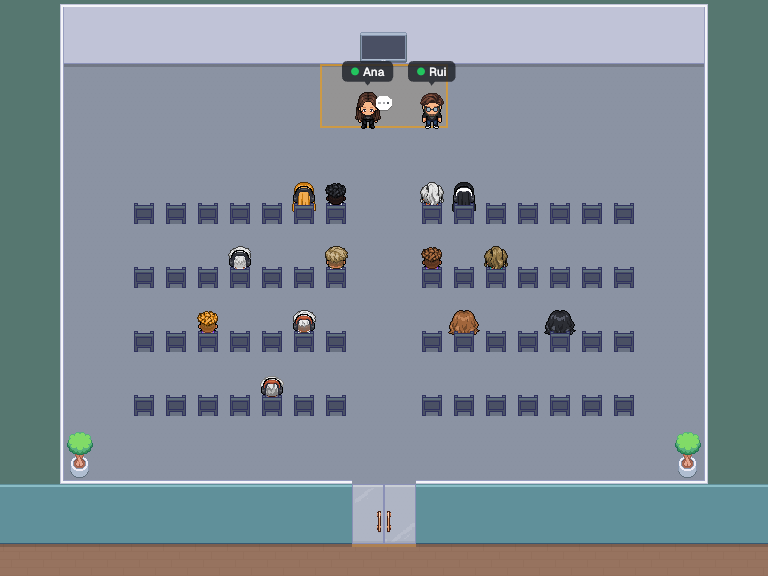
Stage events for your team and for people outside
All-hands, talk or launch: only the people on stage speak, and the audience raises hands and sends questions with votes. Open registration to people outside, with approval and questions, and every sign-up comes in as a lead for the office.
 Ana
 Rui

For team leads
Stay on top of your remote team in real time.
When everyone works from home, managers lose sight of the team. In Bevean Town you see at a glance who’s working, who’s in a meeting and who’s talking to whom, and you can walk over to anyone’s desk to talk right away.
- Who’s onlineThe people list shows the whole team: who’s in the office, in another space or offline, with everyone’s status.
- Who’s in a meetingCalendar meetings set people to Busy automatically and add an icon next to their name. External meetings show when they end.
- Who’s talking to whomAt the top of the list, every conversation and every occupied room, with names, location and a padlock when it’s locked. One click takes you there.
- Walk over to anyone’s deskClick someone: their card shows status, where they are, their desk and local time. “Go to” takes you to them; “Wave” calls them over to you.


Presence · Built into every office, free
With the whole team in the office, nobody can keep track of everything just by watching the map.
How much time each person spends online, available, in meetings and in conversations. It comes on in every office. Only admins see others; everyone sees their own under Preferences › My presence.
Totals per person
Hours online, available, busy, away, in meetings and in conversations, day by day.
Transparent to the team
Everyone sees their own numbers, the same ones admins see.
No content watching
Only what already shows on the map: no audio, chat or screen.
Presence shows time with the office open. It doesn’t replace time tracking.
Chat
A complete team chat, right inside the office.
Public and private channels, direct messages, threads, mentions and reactions: everything you’d get in Slack or Discord, now in the same place as the map, the meetings and the apps. One less tool to pay for and keep open.
Included in every plan, Free too.

Public and private channels
One channel per team, project or client. Anyone can find public ones in the Directory; private ones only for those invited.
Direct messages
With one person or a group. The profile alongside shows status, local time and what you’ve already talked about.
Threads
Reply in a thread without flooding the channel. Follow the threads that matter and also send the reply to the channel when everyone needs to see it.
Mentions
@person, @channel and @here. Mentions notify you even when the conversation is muted.
Files, audio and video
Drop up to 10 files of 25 MB per message, or record an audio or video clip of up to 1 minute.
Search everything
Find any message across all your conversations, even typing without accents.
Saved, pinned and drafts
Save to read later, pin what everyone needs to find and pick up a draft where you left off.
Notifications your way
Per conversation: all messages, mentions only or nothing. Mute for 1 hour, 8 hours or a week.
Your systems in the channel
With the Webhooks app, n8n, Zapier, Make or your own system post straight into a channel, with the APP badge.
And when text isn’t enough, just walk over.
The map sits next to the chat: you see who’s in a meeting and who’s in the office, click “Go to” and keep talking by voice.
Apps
Install only what your team needs.
Each app solves a real pain and starts free, with an allowance big enough to actually use. When you hit the limit, nothing gets deleted: on the Town plan, every app is unlimited.
Team work
- ProjectsNo more tasks lost in chats and spreadsheets.
- NotesWhat the team knows, in one place, not in someone’s head.
- WhiteboardGet the idea out of your head and onto the board, with everyone watching.
- Mind mapA loose idea becomes a plan everyone can see.
- RecordingsNobody has to take meeting notes again.
- MemoConversations outside the office turn into tasks too.
Clients and sales
Start today
Your office, ready in a minute.
- 01
Create the office
Sign in with Google or email and answer two questions: your company name and how many people will work there. The office comes ready, sized for your team, from 1 to 100 people.
- 02
Bring the team
Invite by link or email. The free plan fits up to 3 people, including you, and each one picks an avatar and a desk.
- 03
Install apps
Turn on Projects, Deals, Tickets or whatever you’re missing. They all start free.
Pricing
Free to start. Simple to grow.
No lock-in and no surprises: nothing changes plans on its own.
Takes 1 minute · Sign in with Google · No card needed
Hamlet
$0
- Up to 3 people
- Map, voice and video, chat and calendar
- Apps with a free allowance
- 2 guests with an account
Town
$8.90per person/month
- Every app unlimited
- Recordings with transcripts: 100 hours a month for the team
- On Capital, at $14.90: AI, Memo and unlimited recordings
- Switch plans whenever you want
Trust
Your data, protected and in your hands.
Before you bring your team in, you should know how data is handled. It’s all in the privacy policy; here’s the short version.
GDPR and LGPD
We handle data under the GDPR in Europe and Brazil’s LGPD.
See it, fix it, take it
You can see, correct and delete your data, and ask for a copy whenever you want.
Delete means delete
When you delete your account, your profile, email, photo and sessions are gone right away, and backups within 14 days.
Clients only see the room
People who join through a meeting invite don’t create an account and see nothing else in the office.
No lock-in
Free for up to 3 people, no card. Subscribe, switch plans or cancel whenever you want.
Real people answer
Privacy questions go to privacidade@bevean.com, and we reply within 15 days.
FAQ
Frequently asked questions
Is it really free?
Yes. The Hamlet plan is free for up to 3 people, with the map, voice and video, chat and calendar, and apps come with a free allowance. No card needed to start.
Can I see whether my team is working?
You see who’s online and everyone’s status, who’s in a meeting and who’s talking to whom, and you can walk over to anyone’s desk. Bevean Town doesn’t record screens or track activity.
Do I need to install anything?
No. Bevean Town runs in the browser, and there are also apps for Mac, Windows, Linux, iOS and Android.
Do my clients need an account to join a meeting?
No. The invite includes a link, and your client joins the room from the browser, with nothing to install and no sign-up. They only see the meeting room.
Can I run an all-hands or an open event?
Yes. In an event room, only the people on stage speak, and the audience watches, raises hands and sends questions. Studio has five ready-made room templates. Schedule the event in the Calendar for the office only or open, with registration: people outside sign up on the event page, and every registration comes in as a lead. The spots are the audience chairs.
What happens when the team grows past 3 people?
You move to a per-person plan, where everyone pays from the first person: Town, at $8.90 per person/month, with every app unlimited, or Capital, at $14.90, with AI, Memo and unlimited recordings.
And when an app reaches its free limit?
Nothing gets deleted and nothing changes plans on its own. Whenever you want, you move to the Town plan, where every app is unlimited, right from the office.
Is there a lock-in period?
No. Upgrade, scale down or cancel whenever you want.
Bring your team into the same office.
Create yours now, free for up to 3 people. In a minute you’ll be talking on the map.
Create my free officeFree for up to 3 people · Sign in with Google · No card needed